The fault becomes a ticket - and the ticket goes to the technician your contract says owns it, with their SLA already running.
For facilities, maintenance and security operations that dispatch work to outside vendors: contract-aware dispatch, per-vendor SLA clocks, and a field app the contractor's technicians work in.
The Service Desk is available on its own. Pricing is per site, with device packs - sized to your estate, not to an enterprise-only tier.
Built for the work you outsource.
External vendors, contractors and integrators first - with in-house teams supported in the same workflow. If you're searching for an ITSM, this is one; it runs from day one with no monitoring and not a single connected device.
- Open a full ticket workflow with nothing but a title
- Vendors, contracts, technicians, sites and customers as first-class records - independent of monitoring
- Dispatch to outside companies or your own crew - same lifecycle, same SLA clocks
- Add Health Monitoring later for security; nothing to migrate, nothing to re-enter
A governed lifecycle, not a status free-for-all.
Every ticket follows one clear, fully-logged path - everyone can see who did what, when, and what happens next.
- Open
- Acknowledged
- In progress
- On hold
- Resolved
- Closed
Reopen path - resolved and closed tickets can come back, counted and audited
Deadlines with teeth.
Response and resolution clocks run on every ticket - and the targets come from the vendor contract itself, per priority. Escalation is automatic when a clock runs down.
- 15 min first response
- 4 h resolution
- 30 min first response
- 8 h resolution
- 60 min first response
- 24 h resolution
An example from one contract. IOSentra has no fixed plans - every vendor contract defines its own response and resolution targets per priority, and the clocks on each ticket run on that contract's numbers.
The escalation ladder
- L1TechnicianTicket assigned
- L2SupervisorSLA at 80%
- L3Vendor escalation contactSLA breached
- L4Customer executiveCritical or repeated breach
Your vendors, under contract - and under measurement.
The vendors who fix your systems and the contracts that bind them live inside the desk, not in a drawer.
- A contract per vendor: coverage, per-priority response and resolution SLAs, penalty clauses
- The vendor's technicians live under the contract, with shifts and on-call rotations
- Vendor registry with the certifications you track about them (ISO 27001, SOC 2, GDPR) and partner levels
- Renewal alerts before contracts lapse - auto-renew tracked
- Routing preview before filing: see which vendor the ticket will hit and when they must respond
- Security integrators
- IT services & MSPs
- HVAC & mechanical
- Electrical contractors
- Facilities & general maintenance
- In-house technicians
Track ownership, response times, SLA compliance and resolution performance across every provider and every trade - internal or external.
The right vendor, chosen before you finish typing.
Routing resolves along your location tree and matches contract coverage by site and system type - with a preview before the ticket is filed.
- Device
- Zone
- Floor
- Building
- Site
- Organization
Coverage resolves up the chain - the most specific match wins.
Will be handled by: Acme Facilities - response by 14:30
The desk runs itself between humans.
Four rules keep the queue moving without a dispatcher watching it.
Auto-assign
New tickets route to the covering vendor by contract - no dispatcher required.
Auto-escalate
At 80% of SLA the next level is notified - before the breach, not after.
Auto-close
Resolved tickets close themselves after 72 hours of inactivity.
Duplicate suppression
The same problem doesn't become five tickets.
Add the Health Monitoring product for your security systems, and verified CCTV faults open tickets automatically - attributed to the right device, deduplicated.
Know which vendors earn their contracts.
- Vendor performance: average resolution time, SLA compliance %, repeat-failure rate
- Tickets by status and priority, with resolution trends over time
- SLA tracking across every open clock
- Executive reports - the numbers your management asks for, ready to share
Your vendor's technician works the job in our app.
The external technician gets the queue on their phone: accept, update status, attach evidence and close - one-handed, at 3am, on site, with the SLA clock visible the whole time.
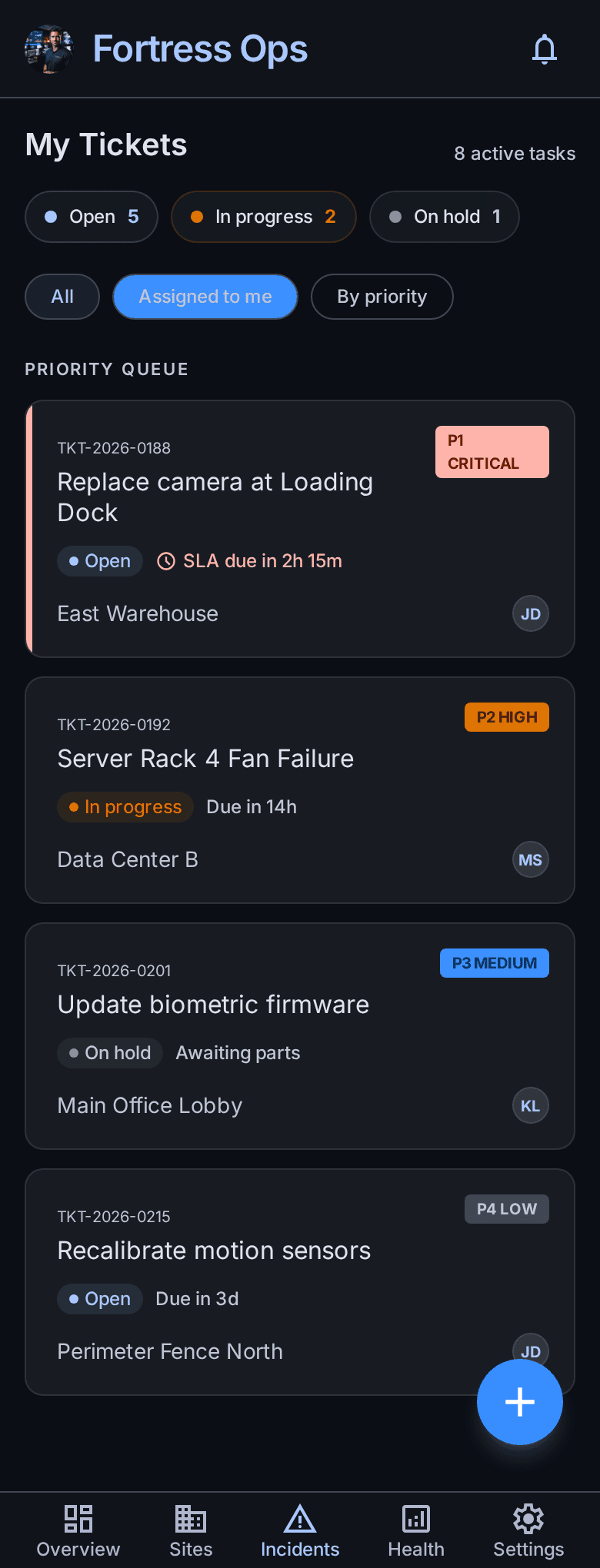
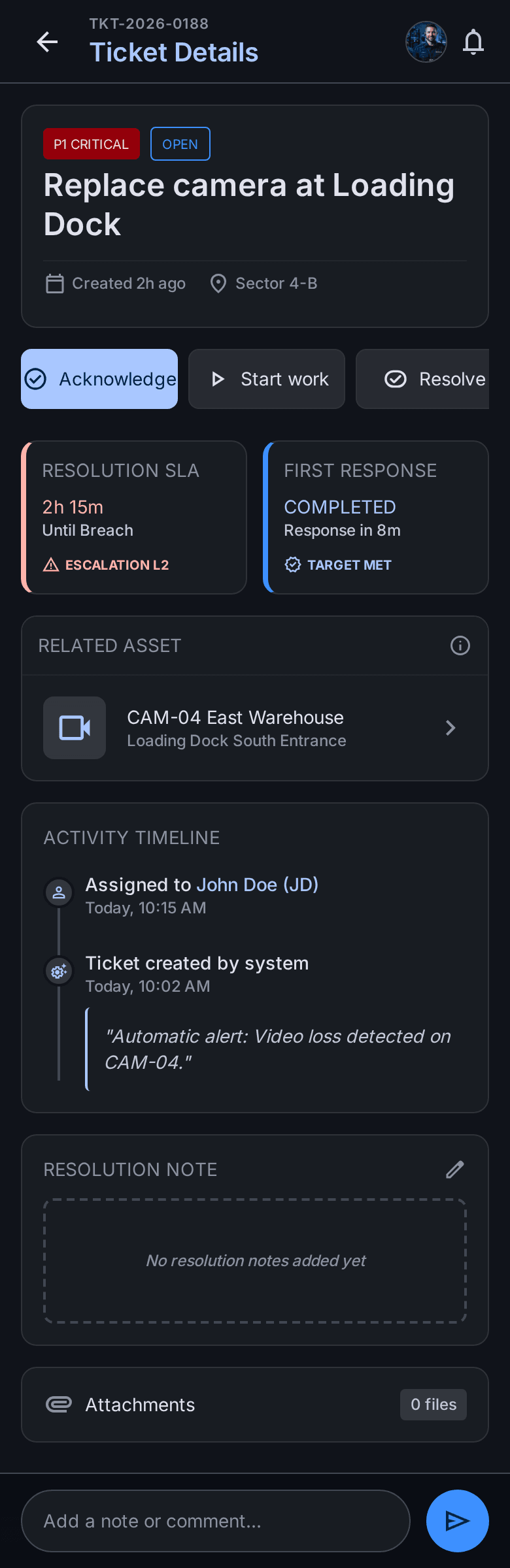
Your contractors work inside the system, not in their inbox.
The real problem is rarely tracking your own team - it's holding an outside company accountable. The vendor portal is the mechanism that does it.
- Each vendor gets their own login, scoped to their contracts and sites only
- Their technicians see their queue, accept, update status and close with evidence
- No email ping-pong, no "I never got the ticket", no status chased by phone
- Every action timestamped against the SLA clock - the audit trail is a by-product of the work, not something anyone has to assemble
Add the security-monitoring engine, and CCTV tickets file themselves.
The Service Desk manages the work your teams already know about, across everything you maintain. Add Health Monitoring - the security add-on - and IOSentra also finds the CCTV failures nobody reported (a missed recording segment, a drifted clock, a dying disk) and opens the ticket for you, attributed to the exact device.
Ready to take control?
Every camera records. Every device communicates. Every issue is tracked. Every ticket is resolved.